I let Codex remove my Intel app debt before macOS did
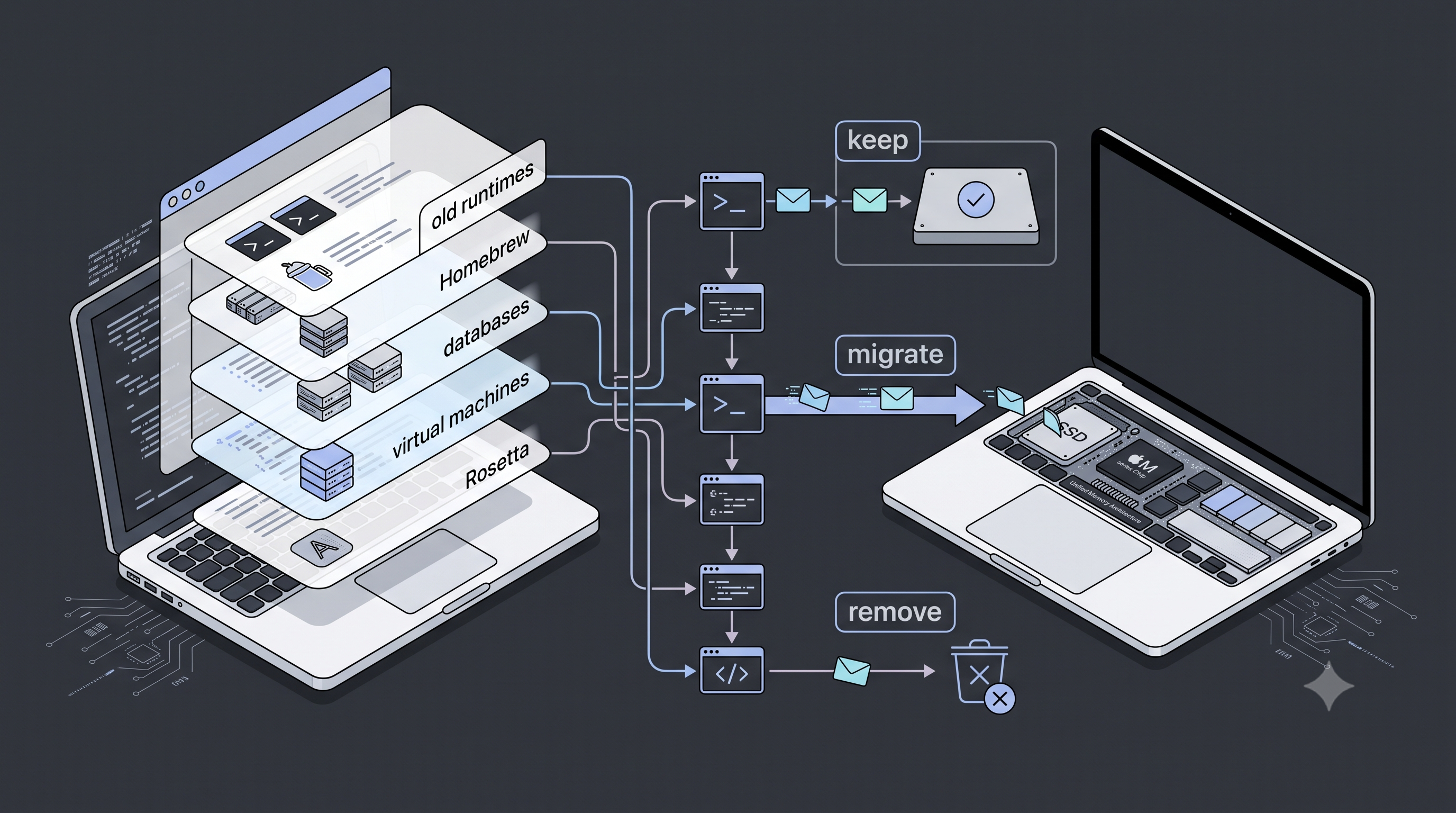
macOS had started occasionally showing me a notification titled “Support Ending for Intel-based apps.” This is Apple telling you, in the gentlest possible way, that Rosetta is on a clock. I did not know which app had earned the notification, and “occasionally” is an extremely unhelpful cadence for debugging anything.
The reason I had this much Intel archaeology is simple: I came from an Intel i5 MacBook Pro to an Apple-silicon M2 Mac. When I bought the M2, I used Apple’s Migration Assistant instead of treating it as a clean install. That was the right move for getting years of projects, settings, tools, and application state across quickly. It also brought across years of Intel binaries, old package-manager trees, helper tools, services, caches, and things I had forgotten I had ever installed.
For a long time Rosetta made that migration feel free. Most of the old things still worked, so there was no reason to inventory them. The support-ending notification changed the economics. I could either discover the breakage one app at a time in a future macOS release, or do the archaeology once while everything still ran.
The obvious answer is “open Activity Monitor, look for Intel, delete things.” That is how you delete a database you forgot existed, break a tool you use weekly, and then blame macOS. I wanted the opposite: find every real candidate, understand what it did, migrate it when needed, remove it when not, and keep going until there was nothing left for the warning to point at.
I used Codex with GPT-5.6-terra medium as the operator. It did the filesystem audit, inspected architectures, found configuration and data, installed native replacements, verified the mappings, and removed the approved targets. I made the only decisions that actually needed a human: keep, migrate, or nuke.
TL;DR
| Thing found | What happened |
|---|---|
| Intel Python, Node, Go, Java, AWS CLI, Docker tools | Native Apple-silicon replacements installed and verified first |
| Vagrant, Mono, PostgreSQL, Redis, old Emacs/Guile/Tcl tooling | Removed after checking for active data or configuration |
| MySQL | Removed only after I explicitly approved deleting the old databases |
| Docker / Colima | Native Docker tools replaced, Colima images and volumes kept |
| Intel Homebrew | Formulae handled individually, then stale links and the empty old Homebrew tree removed |
| VS Code and Claude x64 helper files | Kept: they are bundled fallback resources inside universal apps, not Intel-only apps |
The important bit is not “AI ran rm -rf.” It is that every destructive step had a resolved target and a reason.
The numbers
I did not take a filesystem snapshot before the first removal, so this is not a fake “exactly 12.34 GB reclaimed” number. It is the sum of the sizes measured while investigating. New native installs consume some of that space, and APFS may delay showing freed blocks, so the only honest headline is: at least 9.3 GB of known old data and Intel tooling was removed, while 9.2 GB of Colima data was deliberately kept.
| Area | Removed | Measured footprint | Result |
|---|---|---|---|
| Intel Homebrew | Empty old Homebrew checkout, Cellar, and library tree | 3.13 GB | 60 legacy formula directories eventually reached zero; native /opt/homebrew stayed |
| Vagrant | /opt/vagrant and ~/.vagrant.d, including two old boxes |
1.9 GB+ | Full removal |
| Python | Intel Python 3.11 library tree, Python 3.9/3.10 installs, orphaned Python 3.7 extensions | 1.6 GB+ | Native Python CLI environment kept |
| Node | Two Intel NVM versions, Intel Homebrew Node, and old global modules | 1.11 GB | Native Homebrew Node and migrated global CLIs kept |
| Mono | Mono runtime and Wine Mono cache | 520 MB | Full removal |
| Go | Go 1.11 Intel SDK | 339 MB | Native Go 1.26.5 kept |
| Java | Intel Homebrew OpenJDK 11 | 304 MB | Native OpenJDK 11 registered as the macOS-selected JVM; Intel Corretto 11 and Oracle JDK 8 also removed |
| MySQL | Intel MySQL binaries and approved old database data | 233 MB+ | Full removal after database review |
| Emacs | Intel Emacs 28 | 116 MB | Full removal |
| PostgreSQL | Intel PostgreSQL 14 and local cluster | 80 MB | Full removal |
| AWS CLI | Broken Intel embedded-Python AWS CLI | 68 MB | Native Homebrew AWS CLI kept |
| Everything else measured individually | HAXM, old helper tools, compression libraries, crypto libraries, scripting runtimes, stale Python packages, OSXFUSE, remote.it, and legacy app copies | 100 MB+ | Removed or replaced according to use |
| Colima | Docker images, layers, and volumes | 9.2 GB kept | Explicitly preserved, not counted as reclaimed space |
The structural count is also useful:
| Type | Count / outcome |
|---|---|
| Intel Homebrew formula directories | 60 removed |
| Broken legacy Homebrew links | 77 removed from /usr/local/bin and /usr/local/opt |
| Intel Python generations | 4 removed: 3.7, 3.9, 3.10, 3.11 |
| Intel Java runtimes | 3 removed: Homebrew OpenJDK, Amazon Corretto 11, Oracle JDK 8 |
| Intel remote.it binaries | 3 removed: connectd, muxer, demuxer |
| Intel-only app mains / privileged helpers / launch targets after final scan | 0 |
| Bundled x64 helper resources intentionally left alone | VS Code and Claude, each with arm64 peers |
The 9.3 GB is a lower bound, not net free disk space. Native Java, Node, Python, Docker, htop, wget, AWS CLI, and a few libraries were installed as replacements. The correct accounting is “old Intel stuff removed” minus “new native stuff added,” and I did not pretend the latter was zero.
The warning is broader than an app icon
The audit found old apps and privileged helpers, Python/Node/Go/Java runtimes, MySQL/PostgreSQL/Redis, the whole Intel Homebrew tree, OSXFUSE, remote.it binaries from 2019, and orphaned Python extensions. A dead GNU M4 copy is not a life event. A MySQL database or 9 GB Colima disk is. Treating both as “an old Intel thing” is how cleanup becomes data loss.
The loop that made it safe
The loop was boring and exactly what I wanted:
- Find an Intel candidate.
- Inspect its architecture, configuration, services, data, and real command path.
- Migrate and verify a native replacement if I needed it.
- Show me data before any destructive step.
- Remove only the approved target, then move on.
Codex was unusually good at the unglamorous parts. It could answer questions like “what is in the 10 GB VM data?” with an actual inventory rather than a guess, and it kept the thread straight across a lot of tiny decisions. It also caught when the answer was “this is not used at all.”
AWS CLI, Docker, and Node all followed this order. Node was the useful catch: NVM’s default Node was Intel even though native Homebrew Node existed. Installing a new thing is not proof that tomorrow’s command uses it.
The things that deserved a stop sign
The cleanup had a few proper decision boundaries.
Databases are data, not packages
MySQL had real databases, PostgreSQL had an old cluster, and Redis had an empty data directory. MySQL went only after I saw the database names and approved deletion; PostgreSQL and Redis were unused. A blanket Homebrew uninstall cannot tell those states apart.
Java is a runtime stack, not one binary
I had an unused Intel Homebrew OpenJDK, Intel Corretto 11 selected by default, and an Oracle Java 8 fallback. Native OpenJDK 11 was registered and checked through /usr/libexec/java_home; only then did the Intel JDKs go away.
Virtualization and container data should make you nervous
Vagrant and Mono were unused. Colima held Kafka images, Mongo and Postgres volumes, Clojure images, and build layers, so it stayed while Docker moved to native tools. If an agent says “it is 10 GB of VM data” but cannot list the contents, stop there.
The old Intel Homebrew tree was the long tail
The largest category was not a single app. It was legacy Intel Homebrew under /usr/local: runtimes, compilers, compression tools, crypto libraries, language tooling, and enough dangling symlinks to make any future shell debugging annoying.
User-facing tools got the full migrate-or-remove treatment. Libraries with a native equivalent already installed were removed automatically; libraries with no users, data, commands, or surviving dependents followed. The Cellar reached zero formulae, broken links were removed only after their targets were proven missing, then the empty 1.3 GB Homebrew tree went away.
The false positives you should keep
The final scan still found x64 binaries inside Visual Studio Code and Claude. That sounds like failure until you look at the package layout.
VS Code included x64 ripgrep and Copilot helpers alongside matching arm64 files. Claude did the same for node-pty, and its main executable was universal. These are cross-architecture resources, not Intel-only apps. Deleting them would mutate signed apps and save almost nothing.
This was the final rule:
An x64 file is not automatically an x64 app.
You need to check the executable that macOS launches, then whether an arm64 counterpart exists, before deciding that a bundled file is debt.
What GPT-5.6-terra medium actually added
This kind of task is a good fit for an agent, but only with guardrails.
- It held a large inventory while I answered one decision at a time.
- It translated “what is this?” into architecture, launch state, data footprint, project references, and native replacements.
- It did the repetitive checks humans skip when tired: command path, version, binary architecture, service state, Java selection, Docker architecture, and symlink targets.
GPT-5.6-terra medium did not make the risky calls for me. It made the safe calls cheap enough that I actually did them. I did not have to remember whether libtasn1 was a command-line tool, whether p11-kit had a native copy, or whether an old Python had packages that mattered. I only had to say “migrate” or “nuke” once the evidence was in front of me.
That is the setup I want: not autonomous destruction, just a finite list of facts and decisions.
The final state
The final targeted scan found:
- No Intel-only app main executables.
- No Intel privileged helpers.
- No Intel launch-service targets.
- No Intel Homebrew formulae, commands, stale formula links, or Homebrew tree.
- No obsolete Intel runtimes left under
/usr/local.
The only x64 files left were intentionally bundled resources with arm64 peers inside universal applications. That is a clean end state. More importantly, it is one I can explain.
There was one hiccup after the cleanup: a terminal restart reported that Zsh could not load _brew_services. The remaining file was a 2019 completion symlink pointing at the deleted Intel Homebrew tree. Removing that one broken symlink and regenerating Zsh’s completion cache fixed it. That was the only post-cleanup breakage, which is honestly incredible for this much old state.
← Back to Writing